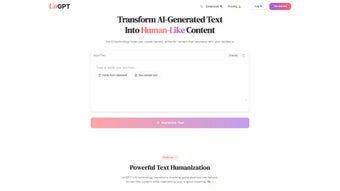

Download UnGPT – AI Text Humanization Tool, Secure & Free
Overview
UnGPT is a cutting‑edge web application designed to turn AI‑generated text into content that reads like it was written by a real person. Whether you’re a marketer looking to bypass AI‑detection filters, a student needing more natural phrasing, or a professional writer who wants to add a human touch to large language model outputs, UnGPT delivers a one‑click humanization experience without sacrificing the original meaning. The platform also includes a built‑in AI detection engine that scores the likelihood of text being machine‑generated, giving you confidence about the authenticity of your final copy.
For users who spend most of their time in browsers, the companion extension lets you humanize text directly inside email clients, document editors, or any web‑based text field. A built‑in word‑tracking dashboard warns you when you’re approaching your usage limits, ensuring you never run out of credits unexpectedly. In short, UnGPT combines powerful transformation algorithms, real‑time detection feedback, and seamless browser integration into a single, secure, and free tool that works across Windows, macOS, Android, and iOS devices via any modern browser.
Key Features & Installation Guide
- One‑click humanization that rewrites AI text into natural, flowing prose.
- Integrated AI detection engine with confidence scores (0‑100%).
- Browser extension for Chrome, Edge, and Firefox to edit text on‑the‑fly.
- Word‑tracking dashboard with low‑usage alerts.
- Supports multiple languages and preserves original intent.
- Secure, GDPR‑compliant data handling – no text is stored after processing.
- Free tier with generous monthly word allowance; premium upgrades available.
How to Install and Get Started
Getting UnGPT up and running is intentionally straightforward. Follow these steps to start humanizing text in minutes:
- Visit the official website. Open your preferred browser (Chrome, Edge, Firefox, Safari) and navigate to www.ungpt.com. The site automatically detects your operating system and presents the optimal interface.
- Create a free account. Click “Sign Up,” enter your email, and set a strong password. You’ll receive a verification link; click it to activate your account.
- Access the web editor. Once logged in, you’ll see a clean editor pane. Paste any AI‑generated paragraph, hit the “Humanize” button, and watch the transformation happen in less than a second.
- Install the browser extension (optional). For seamless workflow, download the extension from the “Extensions” tab. The extension is available in the Chrome Web Store and Mozilla Add‑ons Marketplace. After installation, a small UnGPT icon appears next to your address bar. Click it to enable the “Select‑and‑Humanize” mode, then highlight any text on a webpage and press Ctrl+Shift+U (or Cmd+Shift+U on macOS) to rewrite instantly.
- Monitor your usage. The dashboard at the top right shows remaining words for the month. If you approach the limit, a non‑intrusive notification appears, prompting you to upgrade or wait for the next cycle.
Because UnGPT runs entirely in the cloud, there’s no heavy client‑side installation, no need for admin rights, and no risk of compatibility issues on older machines. The platform is built on modern WebAssembly and secure TLS encryption, guaranteeing fast processing and data privacy.
Compatibility, Pros & Cons
UnGPT is a web‑based solution, which means it works on any operating system that can run a modern browser, including Windows 10/11, macOS Catalina and later, Linux distributions, as well as mobile platforms such as Android 8+ and iOS 13+. The companion browser extension supports Chrome, Edge, Firefox, and Safari, delivering a consistent experience across desktop and mobile environments.
Pros
- Instant results. Humanization occurs in real time, often within a second.
- Free tier. Generous monthly word allowance without hidden fees.
- Cross‑platform. Works on Windows, macOS, Linux, Android, and iOS via any browser.
- Built‑in detection. Confidence scores help you gauge how “human” the text already is.
- Secure processing. No data is stored after transformation; all traffic is encrypted.
- Browser extension. Edit directly in email clients, Google Docs, or any web‑based editor.
Cons
- Internet dependency. As a cloud service, it requires an active connection.
- Word limit on free plan. Heavy users may need to upgrade for unlimited access.
- Limited offline capabilities. No desktop client is available for offline use.
- Potential latency on slow networks. Large documents may take slightly longer to process.
Frequently Asked Questions
Is UnGPT really free to use?
Yes, UnGPT offers a completely free tier that includes up to 10,000 words per month. The free plan provides full access to the humanization engine, detection scores, and the browser extension. Premium plans unlock higher word limits and priority processing.
Can UnGPT bypass AI‑detection tools used by universities?
UnGPT is designed to rewrite AI‑generated content into natural language, which reduces the likelihood of detection by most commercial AI‑detectors. However, no tool can guarantee 100% undetectability, especially against proprietary academic plagiarism systems. Use responsibly and always cite sources when required.
How does the built‑in detection score work?
When you paste text into the editor, UnGPT runs a lightweight classifier that evaluates linguistic patterns typical of AI‑generated content. The resulting confidence score (0–100%) indicates the probability that the input is machine‑written. A lower score means the text already resembles human writing.
Is my data safe when I use UnGPT?
Absolutely. All communications are encrypted with TLS 1.3, and the platform adheres to GDPR standards. Text is processed in memory and deleted immediately after the humanization is returned to you—no logs are kept on the server.
Can I use UnGPT on mobile devices?
Yes. Since UnGPT runs in the browser, you can access the full editor on any smartphone or tablet with Chrome, Safari, or Firefox. The extension is not needed on mobile, but the web interface is fully responsive and touch‑friendly.
Conclusion & Call to Action
UnGPT stands out as a reliable, secure, and user‑friendly solution for anyone needing to transform AI‑generated text into a more human‑like voice. Its one‑click workflow, real‑time detection scores, and cross‑platform browser extension make it a versatile addition to any writer’s toolbox. Whether you’re polishing marketing copy, improving academic drafts, or simply curious about how AI text can be refined, UnGPT offers a free entry point with enough power to satisfy casual users while still scaling for professionals via affordable premium plans. Ready to give your AI‑generated drafts a human touch? Download UnGPT now, start the free trial, and experience smoother, more authentic writing today.



.png)



